Fix Slow External DNS Resolution in Microsoft/Active Directory DNS Server
Aw yaille! I just wrote up a whole explanatory blog post then lost it so this one will likely be brief... or not.
Recently, we found that one of our DNS servers was resolving external hostnames unacceptably slow -- about 5 seconds, give or take. The resolution was so slow, in fact, that all of the clients hopped on to the secondary DNS server thinking that the primary had gone down. After logging on to the server to troubleshoot, I could see that:
- Pinging external hostnames worked well after the hostname resolved. So did traceroute.
- Caching wasn't working at all
- Other AD DNS servers on the network were resolving external hostnames quickly
- The root servers were all there but I deleted and reloaded them anyway - Note: you can actually load root servers from a root server which is cool
- Internal hostname resolution was extremely fast
- A reboot didn't help (you may laugh but this has solved severe AD problems for me)
Because the other AD Servers were picking up the slack, I decided to come back to it later. I went out and had dinner with a friend then returned after a few hours. Upon logging back on to the Internets, an old network admin friend messaged me. I told him what I was seeing and he said he had the exact same issue a few months back.
After a few minutes of trying to recall the solution, he asked "Have you checked your forwarders?" I'd glanced at them but went back to check again. And there it was.. an entry to a machine we'd recently taken down (long story..). I knew the moment I saw the IP that it was the problem. I removed the entry and noticed the forwarded query timeout was equal to drumroll 5 seconds.
To modify your forwarders, open DNS -> Right click on your server -> click Forwarders then Edit.
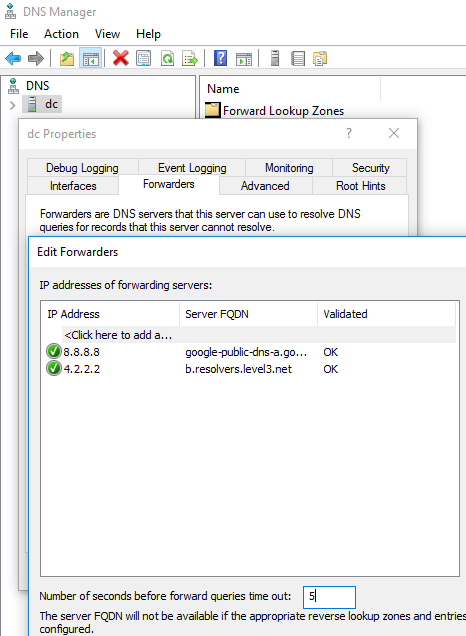
Finding that solution was impossible on the Internet because of the super general terms: Slow DNS Resolution External Active Directory. Nothing really worked for me so hopefully this post will help others in the future.
Update: A colleague of mine mentioned spyware interfering with proper DNS functionality resulting in intermittent resolution problems. So that's something you may want to check with a netstat -bn which shows you what programs are using which ports. DNS uses UDP port 53.