SuSE (SLES) 11 Works Flawlessly with Windows Server 2008 Authentication
Well that couldn't have been easier! Here's all it takes to authenticate SLES 11 to Windows Server 2008 based Active Directory. During the initial install of SLES, I performed the following:
- Selected samba-client and winbind during the software installer phase
- Added my domain's DNS servers to the intitial network config using NetworkManager
- Ensured I had the right DNS search suffix (the name of my domain: base.netnerds.net)
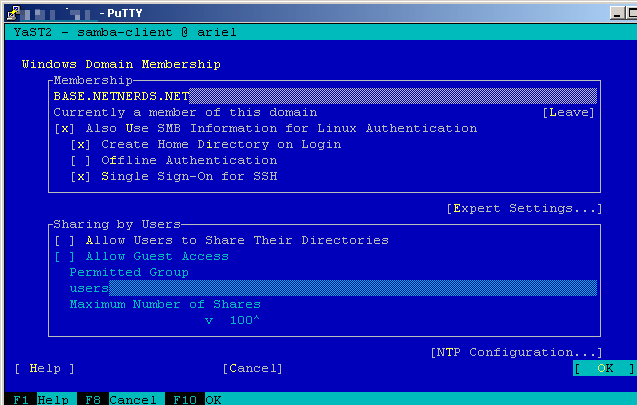
Surprisingly, I didn't even have to configure samba after my install was completed. I was prompted to join the domain during the initial OS install and everything went as expected. Here are the settings I used:
I logged in using the domain\username format and this too, worked as expected:
login as: base\chrissy Using keyboard-interactive authentication. Password: Creating directory '/home/BASE/chrissy'. Creating directory '/home/BASE/chrissy/bin'. Creating directory '/home/BASE/chrissy/.fonts'. Creating directory '/home/BASE/chrissy/.mozilla'. BASE\chrissy@ariel:~>
Next up, setting up NTLM pass-through authentication in Apache!**
Update:** If you plan to use Kerberos, I recommend you skip straight to using Likewise for all of your authentication needs. I had nothing but headaches from reported bugs with SuSe's built-in Samba and krb5/Kerberos.